Vibes.ai
All-in-one web creation tool to create and edit AI generated images and videos.
Context
GA launch: an internal creation tool with 3 weeks
to become a public product
Vibes.ai started as an invite-only tool for employees and contracted creators, built quickly to feed AI content into the Vibes mobile app and the Meta AI mobile feed. I had 3 weeks to redesign it for public GA, and 3 months to take it global.
Previous design: Internal tool was retired before I made this portfolio, so I restored
the original code locally to capture these screens.
Vision for Consumption
Let people play with the ingredients of a video



Vision for Creation
Let creators remix and re-use those ingredients
Remix a character into a new scene, or a scene around a new character, and
carry them across creations.
Creator Feedback
Partnered with a panel of 30 creators familiar with AI creation tools for continuous feedback throughout the process.
Hard to keep characters consistent
Creators want to build their own brand. Maintaining a cohesive visual identity, such as same characters and style, across their work was a core challenge.
Hard to organize and track projects
Many creators first start by generating dozens of variations of images or videos, then curate the best ones into a story. With so many similar looking assets, it was difficult to find and recall specific ones later.
Limited editing capabilities
Many creators rely on tools like Premiere Pro for post production edits. They needed more robust editing controls in one place such as slipping clips, adding transitions, removing elements and more.
GA Launch Prioritization
Prioritized by creator need, weighed against eng and design cost
With three weeks until GA, I worked closely with eng to align on what we could build. To move faster, I often built the front end while eng built the back end, rather than handing over Figma specs and re-updating them on every change.
IA Change
Project-based creation: Easier to group/organize assets.
Instead of generating assets first then organizing them into a project, everything starts with a project. Within a project, you can create assets, edit, and publish.
Previous
Updated
Design Decision
Making it easier to keep characters consistent
Creators had two ways to hold a character steady, both imprecise. We added a third with real control over characters, scenes, and styles.
Describe the character every time
Write the character into each prompt and rely on the model to infer it. Leads to high variability in the outcome.
Attach a reference per generation
Upload an object reference image alongside each prompt. Reduces variability but still lacks control in details.
Persistent, named ingredients
Characters, scenes, and styles become reusable ingredients that live in the project and library.
Introducing Ingredients
Maintain characters, scenes, and styles across your creations
For MVP, creators couldn't create ingredients from scratch. Instead they selected from a Meta-curated library or turned an asset from their own project into a reusable ingredient. Enough to test whether reusable ingredients changed how people worked.
Post GA Addition
Allow creators to turn their assets into ingredients
Creators wanted to turn their own images into ingredients, but extraction depended on the original prompt. Supporting it needed a different pipeline (visual segmentation and analysis), so I designed within the constraint: a flow to make ingredients from platform-made assets while we built upload support.
Easier Way to Edit
Generate & edit in one place
You can now refine, animate, and add music without leaving the tool. The work that used to mean exporting to Premiere now happens where the video was made.
Timeline Interaction Alts
Exploring different timeline layouts
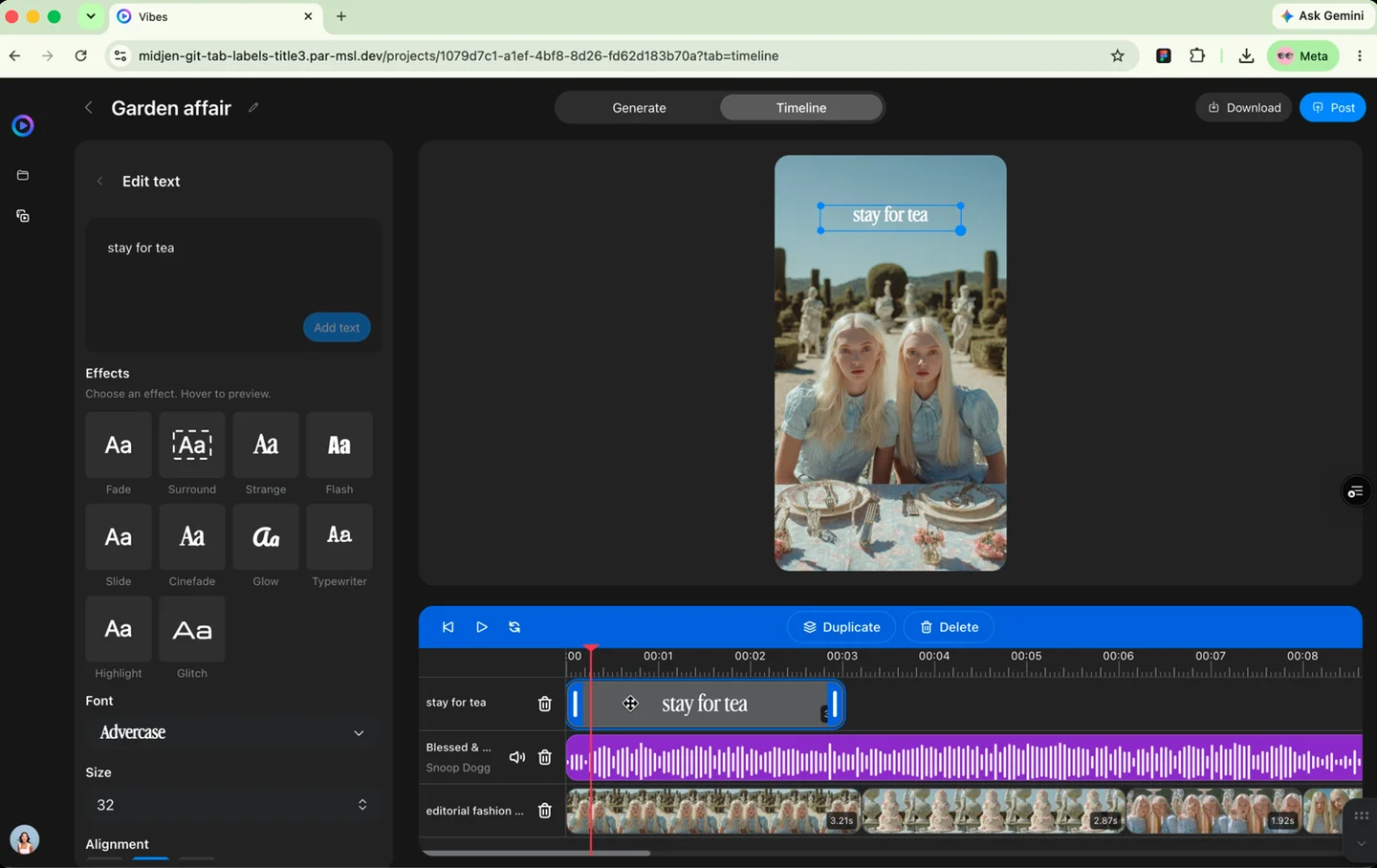
I explored layouts that kept edit controls and assets on separate surfaces, with edits opening in a dialog. But the dialog covered the timeline layers, and creators need to see those layers while they add new ones. So instead of a dialog, I consolidated controls and assets into a single adaptive panel that changes with what you select, keeping the timeline visible throughout.
Previous Design
Final Design
Timeline Final Design
Consolidated asset preview and edit controls in one place
Thinking About the Future
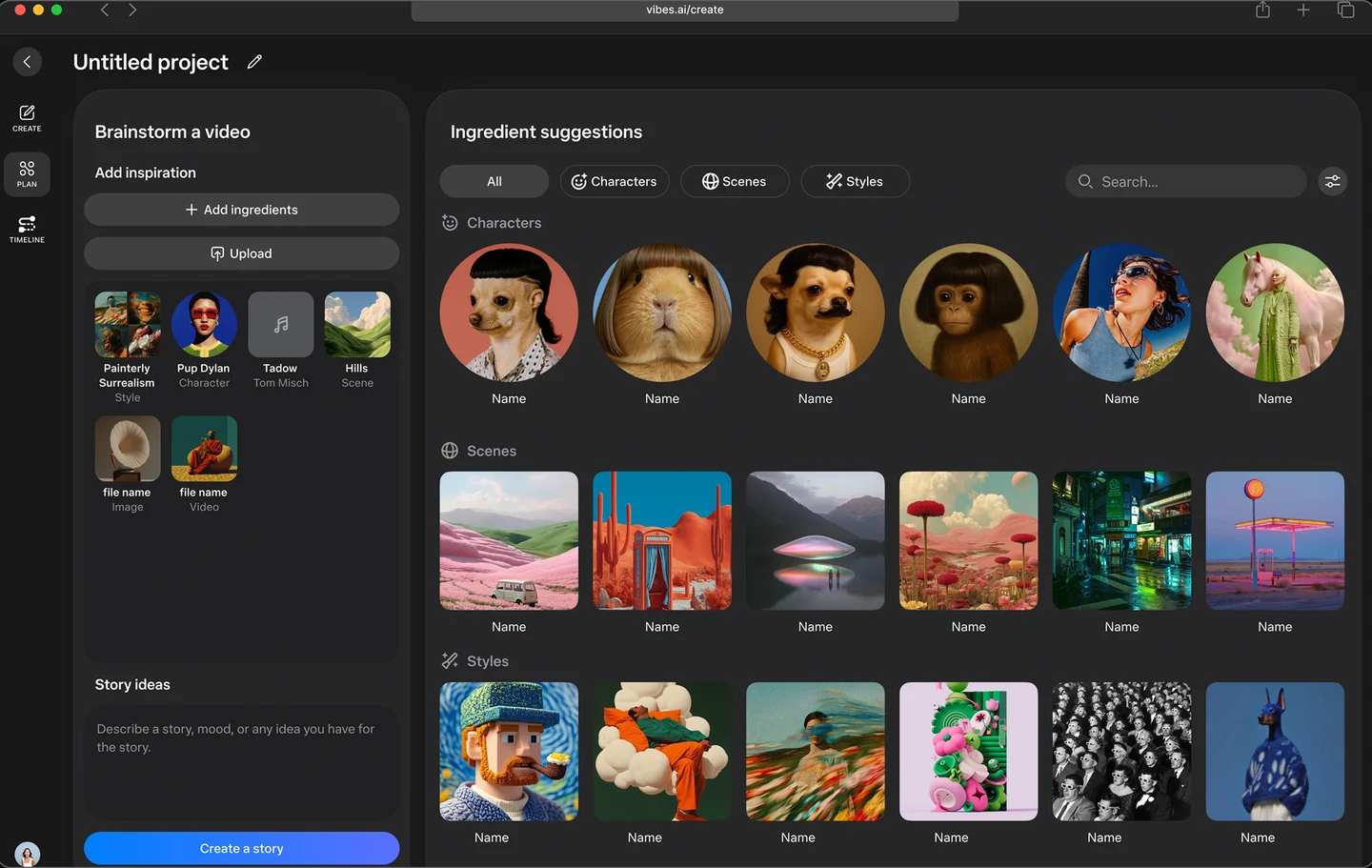
Agentic creation: from prompting to co-creating with agents
Post-GA, I started rethinking how vibes.ai should evolve. Today you prompt for an asset. The next step is an agentic collaborator: you drop in what inspires you, and it helps you find the story.
Result
Vibes.ai launched globally in H1 2026. Content created with Vibes.ai outperformed off-platform content in the Vibes mobile app, driving 50% higher like rates than UGC. In June, a reorg shifted company priorities and the project was paused.